Automating vulnerability intelligence collection does not solve the hard part. If every incoming CVE receives the same priority, the queue becomes unmanageable. In Japan alone, JVN iPedia added 13,131 Japanese-language vulnerability records from April through June 2026, bringing its cumulative total to 290,167. At that volume, teams need to distinguish affected products, confirmed exploitation, reachable systems, and business impact before creating response work.
This guide lays out a practical path from recurring public-source monitoring to human triage. It is written for engineering leads, IT administrators, and security owners in smaller SaaS and IT teams where vulnerability review is one responsibility among many.
The short answer: build asset relevance into the intake process
- Keep product, version, deployment, business use, and owner data available for matching.
- Give vendor advisories, JVN, CISA KEV, NVD, and other sources distinct roles.
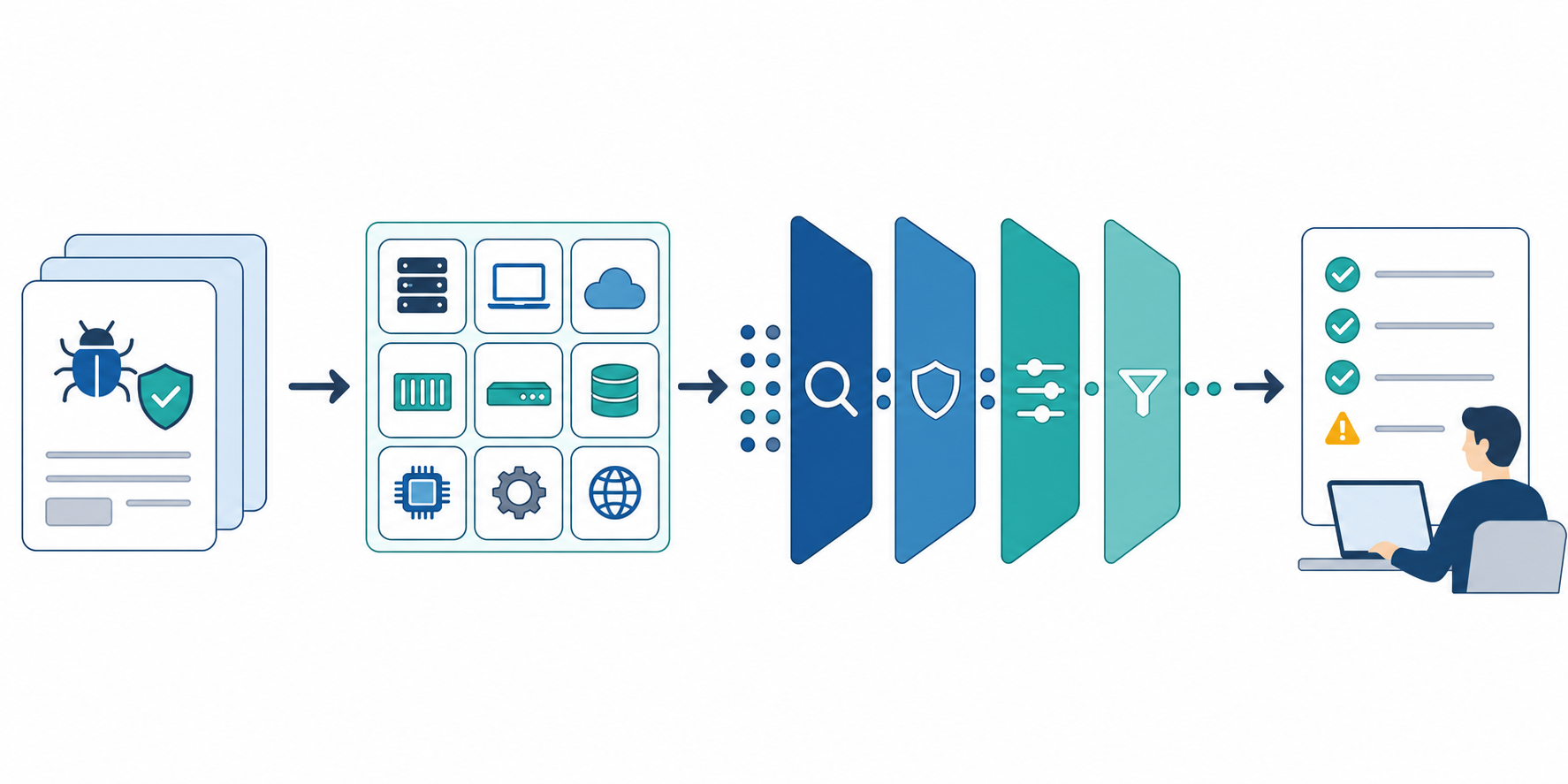
- Triage in this order: asset match, exploitation evidence, technical severity, and business impact.
- Separate urgent handoff from a weekly review, and suppress repeat alerts after a decision.
- Use AI summaries to organize evidence, not to approve patches or accept risk.
Stratum Flow can periodically check public pages and produce reports with source URLs. It is not an asset scanner, SBOM matcher, intrusion detector, emergency alerting system, or patching platform.
Why vulnerability volume cannot set response priority
IPA's Q2 2026 JVN iPedia report shows that 13,011 of the 13,131 new Japanese-language records came from NVD. Sending every published record to a shared inbox would mostly produce irrelevant products, duplicate references, and updates with no confirmed asset match.
A single score cannot finish the prioritization work either.
- The FIRST CVSS v4.0 User Guide explains that the Base Score measures vulnerability severity and should not be used alone as a risk assessment.
- The CISA Known Exploited Vulnerabilities Catalog identifies vulnerabilities with evidence of exploitation and is intended as an input to prioritization.
- FIRST's Exploit Prediction Scoring System estimates the probability that a CVE will be exploited in the wild within 30 days. It does not know whether that CVE affects your environment or how damaging exploitation would be there.
Collection and environment-specific risk decisions therefore need separate stages.
Step 1: connect the watchlist to an asset inventory
Start with 10 to 20 products. Internet-facing services, identity, payments, and developer infrastructure are usually easier to justify than importing every software name at once.
| Field | What to record | Example |
|---|---|---|
| Product | vendor and product name | GitHub Enterprise Server |
| Version | deployed release or update channel | 3.x, stable |
| Exposure | public, internal, or development only | internet-facing |
| Business use | workflow the product supports | source control and CI |
| Owner | person who verifies applicability | developer platform owner |
| Maintenance window | when a change can be deployed | Wednesday evening |
A product name is not enough to determine exposure. Version, configuration, reachability, business use, and recovery options make recurring collection actionable.
Step 2: assign each source one job
Avoid treating one database as the entire vulnerability program.
| Source | Primary information | Operational role |
|---|---|---|
| Vendor advisory | affected versions, fixed versions, mitigations | final implementation check |
| JVN / JVN iPedia | Japan-focused notices, summaries, related records | discovery and regional context |
| CISA KEV | exploitation status, catalog date, required action | urgent-review candidate |
| NVD / CVE | identifiers, CPE, CVSS, references, revision history | technical enrichment |
For structured matching at scale, use purpose-built data access such as the APIs and update feeds listed in NVD Data Feeds. JVN also publishes MyJVN tools and APIs for collecting and filtering JVN iPedia records.
Stratum Flow fits a different layer: checking public vendor advisory indexes, JVN report listings, and government alert pages on a schedule, then summarizing changes with source links. Each job accepts one Seed URL, so split sources with different roles. Seed URLs: Usage and Examples explains the setup.
Step 3: triage through four gates
When a new CVE appears, review it in this order instead of sorting on score alone.
1. Asset match
Check product, version, component, operating system, and configuration against the environment. If the available information is incomplete, label it unclear rather than not affected.
2. Exploitation evidence
Record KEV inclusion, vendor-confirmed attacks, and official mitigations. If you use EPSS, combine it with the asset match; the probability alone cannot decide the response.
3. Technical severity
Read the CVSS vector, attack path, privileges, user interaction, and confidentiality, integrity, and availability impact. Preserve the conditions required for exploitation instead of reducing the record to Critical.
4. Business impact and response feasibility
Check exposure, data handled, outage impact, compensating controls, fixed-version availability, and the next maintenance window. Only then assign an owner and review deadline.
| Example state | Conditions | Next action |
|---|---|---|
| Review now | deployed asset plus confirmed exploitation or possible compromise | route to the security owner and invoke the incident process where applicable |
| Review within one business day | likely asset match plus public exposure or high operational impact | verify version and configuration, then confirm mitigation and fixed release |
| Weekly follow-up | confirmed asset with constrained attack conditions, or incomplete vendor details | monitor updated advisories and vendor guidance |
| Close with evidence | team confirmed that the product or affected version is not deployed | record evidence and checked date, then suppress repeat alerts |
These times are examples, not universal service levels. Replace them with your incident policy, contractual duties, regulatory requirements, and system criticality.
Step 4: use one response-note schema
A prose summary makes the next owner re-read every source. Keep these fields stable:
CVE / advisory ID:
Confirmed change:
Affected product and versions:
Our asset match: yes / no / unclear
Exploitation evidence: KEV / vendor-confirmed / not confirmed
Severity details: CVSS score and vector / attack conditions
Business impact:
Vendor fix or mitigation:
Owner and review due:
Primary source URL and publication date:
Checked at:
"A fixed version exists" is not the same as "we can safely deploy it." The system owner still needs to review downtime, compatibility, mitigation side effects, backups, and rollback conditions.
Step 5: automate vulnerability intelligence monitoring by delivery path
Define alert conditions before automating collection.
| Candidate for immediate human handoff | Candidate for weekly review |
|---|---|
| deployed asset plus KEV inclusion or vendor-confirmed exploitation | asset match still unclear |
| internet-facing identity, payment, or administrative function | affected and fixed versions not yet confirmed |
| official compromise indicators or emergency mitigation | deployed asset with constrained attack conditions |
| matches the organization's incident threshold | confirmed non-match retained for audit history |
The weekly brief should include revisions as well as new disclosures. Affected versions, fixed releases, mitigations, and exploitation status can change after a CVE first appears. NVD's modified feed includes both newly published and revised records.
Reusable research instruction
Review the specified vendor advisory index, JVN pages, and CISA KEV public pages.
List vulnerability records published or updated since the previous review.

For each item, return CVE or advisory ID, confirmed change, affected products and versions,
exploitation evidence, CVSS and attack conditions, vendor fix or mitigation,
primary source URL and publication date, and unresolved questions.
Exclude products outside the supplied inventory. If version or configuration applicability
cannot be determined, write "unclear." Verify KEV inclusion and vendor-confirmed exploitation
against primary sources rather than secondary coverage.
Do not approve patching or risk acceptance. State what the accountable owner must verify next.
If no item qualifies, record the pages checked, review period, and "no qualifying updates."
Use How to Write Effective Research Instructions when refining the fields and exclusions. A practical first run is one vendor, no more than 10 products, and a one-week review period.
Common failure modes
1. Alerting on every high CVSS score
The CVSS Base Score is severity, not a complete environment-specific risk score. Confirm at least the product, version, configuration, and exposure before routing an alert.
2. Watching new records but not revisions
Affected versions, fixes, mitigations, and exploitation information may arrive later. Keep the previous value and checked date for each identifier.
3. Treating an AI summary as a patch decision
The summary is an intake record. The owner must review the vendor advisory, actual configuration, change procedure, backup, and rollback plan.
4. Using a scheduled report as the emergency channel
A weekly job should not be the only detection route for urgent vulnerabilities. Pair it with vendor notifications, scanners, EDR, SIEM, and an incident response process appropriate to the environment.
Where Stratum Flow fits—and where it does not
Stratum Flow is useful as a supporting workflow when:
- public vendor and government pages need the same weekly review format;
- affected-version or fixed-version revisions need to retain source URLs;
- engineering, IT, and security owners need one brief of unresolved checks;
- the team needs to distinguish a verified no-change result from a missed review.
Use dedicated tools for installed-asset discovery, SBOM matching, real-time compromise detection, and automated patching. To start in Stratum Flow, place one official advisory index in the Seed URL and list products, exclusions, and output fields in the research instruction. Dashboard Overview and Basic Settings covers the job-creation flow.
Summary
The goal of automating vulnerability intelligence is not to collect the largest CVE feed. It is to move from asset match to exploitation evidence, technical severity, and business impact, then hand the source material to an accountable owner.
Next step
Try a weekly watch for one vendor and up to 10 products